best carrd template professional directory 2025
Which Carrd layouts work best for listing professionals, trades, and local services — and how to make them rank.
Carrd remains a superb lightweight choice for single-page directories. This guide compares the top Carrd template approaches you can use in 2025 — card grids, searchable listings, map-first layouts, and minimal profile stacks — with pros, cons and practical SEO tips so your directory actually gets found.
Top Carrd template approaches for professional directories (2025)
Below we compare four common Carrd patterns you'll see used for directories. Each approach has clear strengths and trade-offs — pick the one that matches your goals and traffic expectations.
| Template approach | Best for | Strengths | Weaknesses |
|---|---|---|---|
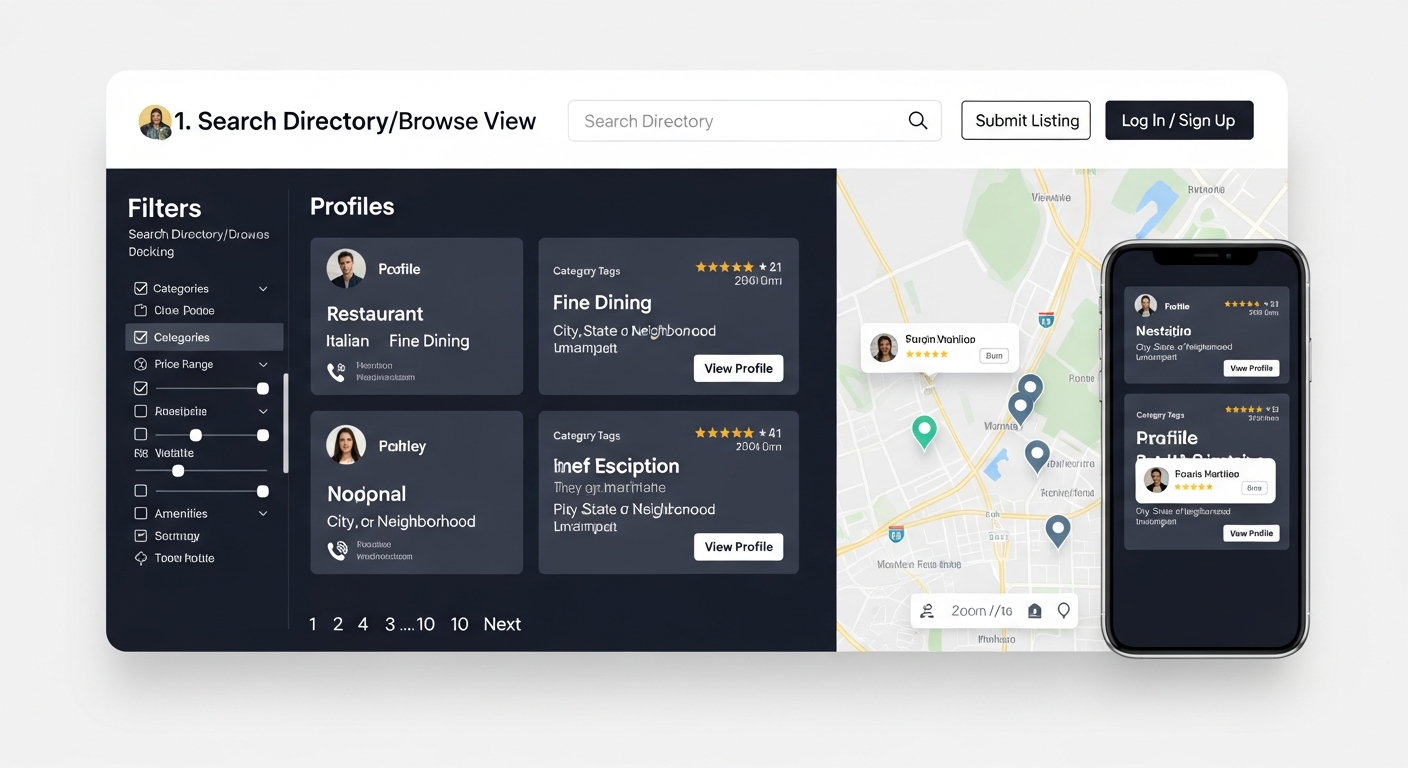
| Card Grid (profile cards) | Local directories, service listings | Fast to build; visually scannable; mobile-friendly | Limited filtering without embeds/scripts; poor SEO for many list items on one page |
| Searchable Listing (with external search/embed) | Directories with hundreds of profiles | Better UX for large lists; search & filters improve discovery | Requires third-party embeds (Airtable, Table2Site), which can affect load time and SEO |
| Map-first layout (map + pins + profile cards) | Location-based services & trades | Great local discovery; intuitive for users searching "near me" | Maps usually need paid API or embeds; increased complexity and load time |
| Single-profile stack (one profile per page via subdomains or cloned Carrds) | High-value professionals where individual pages rank | Best SEO per professional; each page can have unique meta, schema and keywords | More management overhead; not ideal if you need a single consolidated directory view |
Card Grid — quick wins
Card grid templates are the most common starting point. Cards display name, role, short bio and CTA (call button, booking link).
- Fast to implement on Carrd — good for MVPs
- Works well on mobile with stacked cards
- Pro tip: Paginate or lazy-load content if you have many listings to avoid a single long page that hurts performance.
Searchable Listing — scale carefully
For directories beyond a few dozen entries, use a searchable embed (Airtable, Supabase, or hosted JSON + client-side search).
- Better UX for users searching by skill, suburb or rating
- Client-side search is invisible to Google — you'll need server-side indexable pages or sitemap workarounds
- Tip: Expose key entries as indexable pages or use schema to help search engines understand your list.
Map-first — best for local discovery
If location is the primary filter (plumbers, cleaners, tradies), a map-first layout helps users find contacts quickly.
- Improves user engagement and clicks to call
- Maps increase API costs and can slow loading if not optimised
- Optimization note: use pre-rendered static map images for listing previews and load interactive maps only when needed.
Single-profile pages — SEO-first approach
Cloning a thin Carrd for each professional (or using subfolders) gives each listing a unique URL and metadata — ideal for ranking individual professionals.
- Each profile can target niche keywords and have structured data
- More work to maintain unless you automate content updates
- This is the pattern that converts best when combined with local SEO and schema.
SEO considerations for Carrd directories
Carrd is fantastic for fast, mobile-first pages — but there are SEO trade-offs to consider. Below are practical steps to maximise organic traffic.
Indexability & site structure
- Single-page directories are easy for users but hard to index for many items — search engines prefer separate pages for distinct entities.
- If you must use one page, create indexable profile URLs (subpages or subdomains) for your top performers and link to them from the main Carrd.
Structured data (schema)
Structured data is the single most effective on-page tactic to help Google understand listings.
- Add ItemList and LocalBusiness schema for directories and businesses respectively.
- Include key properties: name, address, telephone, geo coordinates, url, and image.
- Note: Carrd limits head edits on standard plans — you may need Carrd Pro or server-side rendering to inject full JSON-LD for many items.
Performance & Core Web Vitals
Fast load times matter more than ever. Heavy embeds and maps will hurt scores and rankings.
- Prefer static thumbnails and lazy-load interactive elements.
- Compress images, use modern formats (WebP), and keep JavaScript minimal.
Linking & discoverability
Directories succeed when they make it easy for search engines and users to find listings.
- Create sitemaps for all indexable profiles — Carrd Pro supports sitemap generation for pages inside a site.
- Encourage listed businesses to link back to their profile (mutual links increase authority).
Customisation and integrations that matter
Carrd’s simplicity is its strength — but many directories need integrations to behave like full apps. Below are practical, low-complexity add-ons that turn a Carrd template into a production-grade directory.
Data & content sources
- Airtable or Google Sheets as the canonical database (embed results but also publish key pages for indexing).
- Supabase or a small headless CMS for higher-performance needs.
- Tip: Keep a CSV export of profiles to aid sitemap and JSON-LD generation.
Forms, bookings & ratings
- Use simple form providers (Formspree, Getform) or embed booking links to reduce friction.
- For ratings and reviews, consider third-party widgets that can be displayed on cards and individual pages.
Maps & geolocation
- Static map thumbnails + on-demand interactive map to reduce API calls.
- Use geo coordinates in schema for better "near me" results.
Analytics & growth tracking
- Install analytics (GA4) and conversion tracking for contact clicks and form submissions.
- Track which profiles drive leads — that informs featured listings and monetisation decisions.
When Carrd is not the right choice
Carrd excels for lightweight directories and MVPs. However, there are clear scenarios where a different platform will save time and improve outcomes.
- Thousands of listings: If you expect thousands of indexable entries, a CMS with server-rendered pages (WordPress, Ghost, or a custom app) is better for SEO and performance.
- Complex filtering & faceted search: Advanced search experience generally needs a backend search engine (Algolia, Elastic), not client-side JS.
- Monetisation & user accounts: If you want payments, user dashboards, and a marketplace model, choose a purpose-built product platform or web app stack.
Frequently asked questions
Can a Carrd directory rank for local searches?
Will using Airtable embeds hurt SEO?
Is it worth upgrading to Carrd Pro for a directory?
Need help making a Carrd directory perform?
A well-designed Carrd template can be a fast, cost-effective directory — but turning it into a lead-generating, discoverable product often requires a few technical steps: unique indexable pages for high-value profiles, JSON-LD for search engines, a sitemap, and analytics tied to conversion goals.
Small, tactical improvements (structured data, load-time optimisations, and properly configured meta tags) typically deliver the biggest uplift in organic traffic and enquiries. If you prefer to DIY, prioritize those items. If you'd rather not manage technical integrations, consider a managed approach where the underlying design stays simple but the SEO and performance are professionally handled.
Ready to launch your professional directory?
Whether you pick a Carrd card grid or a map-first template, focus on indexable content, structured data and fast mobile performance. Those are the levers that drive organic traffic and enquiries.
Tip: Start with a Carrd MVP to validate demand. If you need help moving to indexable pages or adding schema, technical partners can implement those steps without redesigning your whole site.
